Tag pages stay there for your readers, but stop competing with your posts in Google.
What it does
It's a must use plugin just a few lines long: a plugin WordPress always loads, without activation, from the wp-content/mu-plugins folder. Whenever someone opens a tag archive, it adds the X-Robots-Tag: noindex, noarchive header to the response.
With that, Google and other search engines don't index those pages or keep a cached copy. The tags on each post remain visible and linked, so your readers can still browse through them.
Why tags
On many blogs tags are created on the fly and most end up with one or two posts: near-empty pages that repeat what's already elsewhere and that Google crawls anyway. If your blog's real structure is carried by its categories, taking tags out of the index makes it clearer which pages matter. Before installing it, we review with you how many posts each tag has, in case any of them gathers a lot of content.

/wp-content/mu-plugins.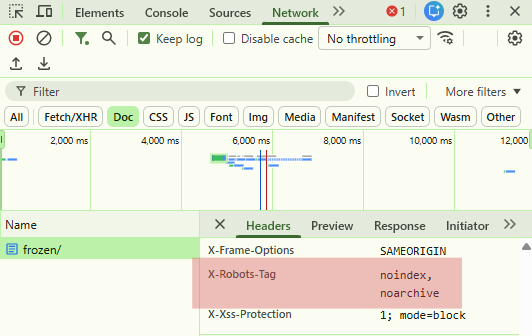
X-Robots-Tag: noindex, noarchive header (Chrome DevTools, Network tab).How it works
- Copy the file into
wp-content/mu-plugins(create the folder if it doesn't exist). - WordPress loads it automatically: it shows up under Plugins, on the Must-Use tab, with no activate button.
- Open a tag archive and check the response headers for X-Robots-Tag: noindex, noarchive.
Requirements
- Installed as a must use plugin in
wp-content/mu-plugins.
Want it on your WordPress site?
We'll install it, and first we'll review your tags to make sure taking them out of the index really makes sense.